
Visibility first, AI second
AI needs data to work on, so in digitisation it usually comes a step later. If your records are still in WhatsApp and on paper, there is no flow to automate yet. In that case the right answer is "one place of record first, AI later", and we will tell you that plainly.
Once visibility exists, AI takes part of the work off your hands: it catches anomalies on its own, prioritises tasks and routes incoming messages to the right person. The user doesn’t track everything one by one; the system pulls their attention where it’s needed.
Uses that actually work in practice
AI does best on tasks where the input is text or documents and the same job comes up many times a day, such as sorting incoming requests by topic or reading the amount from an invoice photo. Added to your existing system, a step like this typically goes live in 2-4 weeks; querying your data in plain language takes 3-5.
| Use | Example | Time |
|---|---|---|
| Classification and routing | Sorting an incoming request by topic and urgency | 2-3 weeks |
| Document data extraction | Reading amount, date and line items from an invoice photo | 2-4 weeks |
| Semantic search | Finding it in a catalogue or document without the exact keyword | 2-4 weeks |
| Automated summaries and reports | Producing a management report from periodic data | 2-3 weeks |
| Natural-language querying | Answering "which product sold most last month?" | 3-5 weeks |
A typical budget for this service is US$2,500-7,000, excluding VAT (as of October 11, 2026). Where you land in that range depends on the number of user types, the systems to connect and how much design work there is; the exact figure comes as one price once the scope is written down.
Cost and timeline guide
Every budget band, our rates by role and the timeline for each scope tier, on one page.
Pricing
The four engagement models, payment terms and what the price covers.
A chat box is usually the wrong answer
An AI step that slots into the existing flow is almost always used more than an assistant added as a separate chat window. When people say "let’s add AI" they usually picture that window, but the most valuable uses are invisible: they run in the background, halve the work a user used to do in two steps, and ask for no new habit.
What AI automation looks like in a shared inbox
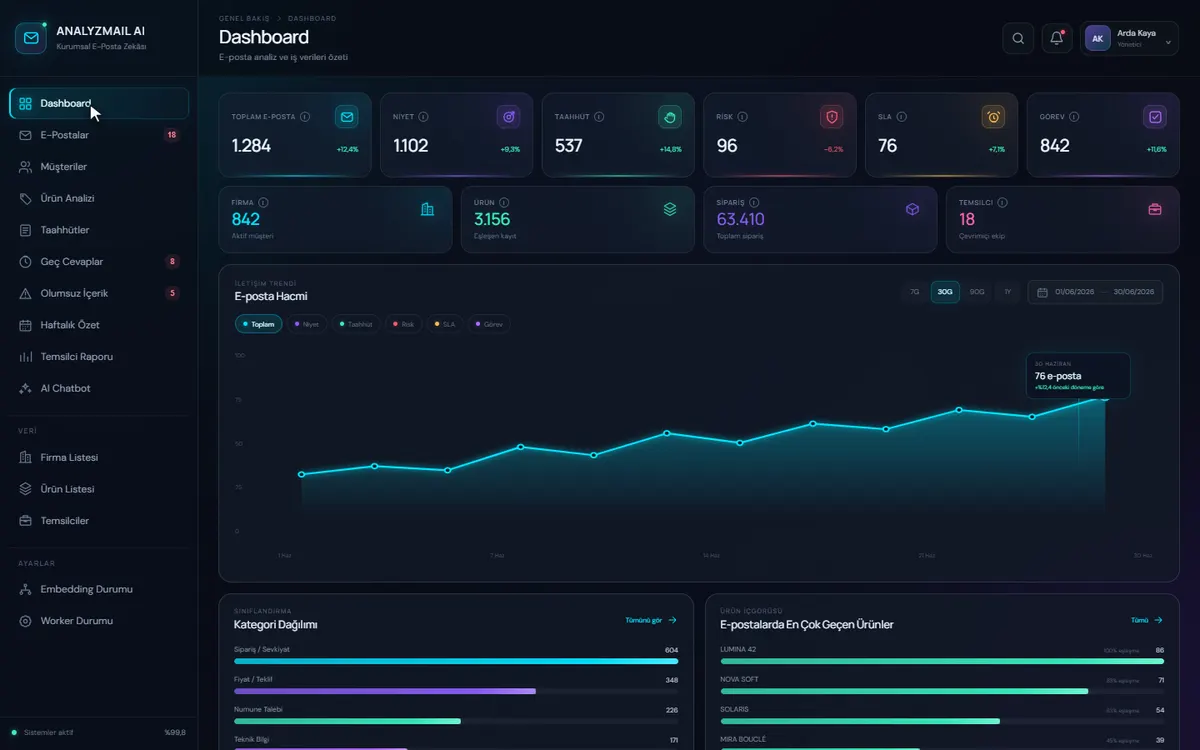
Every email that lands in the inbox is classified by intent, commitment, risk and SLA. Late replies and open commitments become a work queue, and a manager can ask the archive questions in plain language. The AnalyzMail AI demo shows this set-up on sample data.
Which process should you automate with AI first?
The best place to start is a task someone on your team does many times a day and knows the right answer to. Sorting incoming requests by topic and urgency is a typical example: if the AI puts a request in the wrong place, it’s spotted and fixed straight away. A classification job like this takes 2-3 weeks.
A good first candidate
- It repeats dozens of times a day
- The input is text, email or documents
- A mistake is easy to spot and correct
- Someone does this today and knows the right answer
Better left for later
- Your data isn’t collected in one place yet
- The task only comes up a few times a month
- One mistake causes serious harm and nobody is there to approve
- Simple rules can handle it, in which case classic automation is cheaper
Going live: side by side first, then with approval
At first the AI’s suggestions are only recorded, and every decision that reaches a customer or a system still comes from your team. Once its suggestions match the team’s decisions closely enough, we move to approved use, and we agree on that moment with you by looking at the comparison.
- 01
Example set
We collect real past examples with their correct answers. Testing is done against this set.
- 02
Running in parallel
The AI records its suggestion while the team decides as before. The two results are compared.
- 03
Approved use
The AI prepares the draft and the user approves or corrects it in one tap. Every correction is logged.
- 04
Regular review
Corrected examples and usage cost are reviewed at set intervals, and confidence thresholds are adjusted.
This order lets you see whether the AI actually helps before your team has to rely on it. You get a working version every week during development.
Frequently asked questions
How much data does AI automation need?
Uses such as classification and text processing don’t need a large dataset; ready-made language models work from a handful of examples. What matters is that the data is building up consistently in one place. If your records are scattered, the first step is building one place of record, and AI comes after that.
What happens when the AI gets something wrong?
In the flows we build, AI doesn’t make the final call; it prepares the first draft and the user confirms it. Low-confidence results are flagged separately and routed to a person. Decisions are also logged, so what was produced from which input can be reviewed afterwards.
Will our data be used to train the AI model?
No. With enterprise API usage, excluding data from model training is standard, and we put this in writing at the start of the project. Where sensitive data is involved, masking or models running on your own infrastructure can also be considered.
How long does AI automation take and what drives the cost?
An AI layer added to an existing system typically takes 2-4 weeks. Alongside the development cost there is an ongoing usage cost: charging per model call. That item depends on your transaction volume, and we estimate it together at the start of the project so it holds no surprises.
Why build this rather than use an off-the-shelf AI tool?
Off-the-shelf tools are good for general tasks, and we often suggest trying them first. Building your own makes sense when the AI step has to work inside your system: writing results straight into your own task list, classifying with your categories and keeping a record of every decision.
Does it work well with Turkish or other non-English text?
Current language models handle Turkish and other major languages comfortably. The real risk is industry-specific abbreviations and product names. That’s why we test with your real examples and see where the AI is weak before it goes live.