
The real bottleneck: workshop time
In most shops the lifts fill unevenly through the day: with phone bookings capacity is invisible, so one hour sits idle and the next overflows. Even when requests still arrive by phone, writing them into the system by lift and technician shows you which hours are free. Online booking can be added on top of that calendar later; you don’t need it to start.
Start with one link
The switch doesn’t happen all at once. Digitise the job card first, and ask the technician for nothing but photos and the work performed; the office completes the rest. Paper can run alongside for a few weeks. Once the team sees the second round of typing disappear, scheduling, customer updates and the invoice integration are added in turn.
Where the most revenue leaks: approving extra work
A quote with photos and itemised prices is far more convincing than a fault described over the phone: approval rates usually rise and disputes at handover fall. The same record lands in the car’s service history and turns into repeat work at the next service.
Try it: the ServisPro demo
ServisPro is an interactive demo we built for auto repair shops: online booking, the job card flow and parts stock tracking in one panel. It runs on sample data; you can try it from the demo page below.
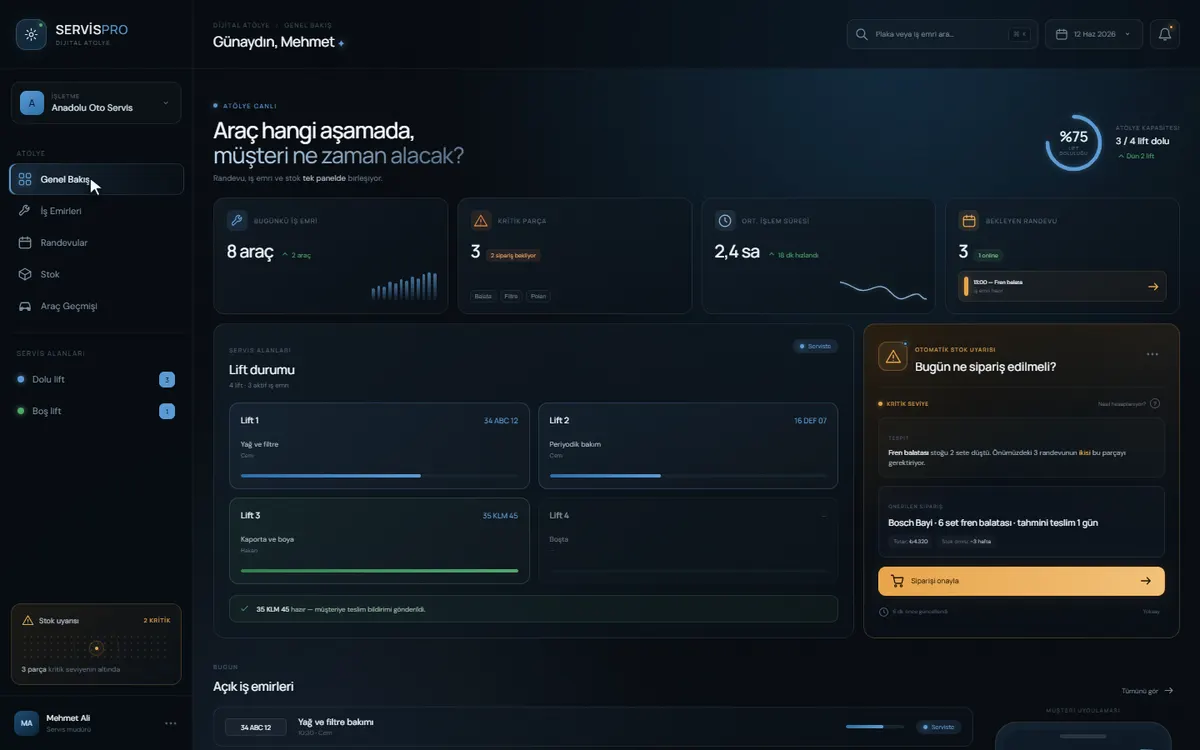
A car’s route through the workshop
Each car is recorded once by licence plate, at booking or when it turns up, and the same details aren’t typed again between check-in and invoice. The office sees on the panel what stage every car is at, and the customer’s status message comes from that same record, so nobody has to ring you to ask where their car is.
Check-in photos are one of the smallest steps in the flow and one of the most useful. A few pictures taken when the car arrives record the scratches and dents that were already there, which cuts short the “that scratch wasn’t there before” argument at handover. The person taking them is already standing by the car, so it adds no real work.
How should a repair shop track parts stock?
Keep parts stock tied to the job cards. Stock discrepancies mostly come from parts that were fitted but never written on a job card; when the two records are linked, the gap shows up early. In the ServisPro demo, parts stock sits in the same panel as the job cards.
Stock deducted as you go
A part comes off stock when it’s added to a job card, so a count discrepancy is noticed the same day.
Minimum level alerts
Fast-moving lines such as filters, brake pads and oil trigger an alert when they drop below the level you set.
Returns and warranty
Which part went on which plate is on record, so supplier returns and warranty claims start from that record.
Cost and selling price
The part’s purchase cost and the price charged to the customer are kept apart, so the margin on each job card is visible.
Getting stock perfect from day one is hard. The practical route is to start with a few dozen of your fastest-moving lines, get the counts right on those first and widen the list afterwards.
The rollout: what changes at each stage
The plan is built to run while the workshop keeps working. The technicians’ day only changes at the job card stage; the later stages mostly affect the office and your customers. Wherever you decide to stop, what has been built up to that point works on its own.
- 01
Mapping the flow together
30 minOn a free call we go through your lifts and technicians, how a job card travels today and the software you already use. The first link to digitise comes out of this.
- 02
Digital job cards
2-4 weeksTechnicians add photos and the work performed; the office completes the rest. Every week you get a working version to open and use, and the tasks sit on an open list you can see.
- 03
Running alongside paper
Paper stays in use for a few weeks. Screens that slow the mechanics down get simplified during this period.
- 04
Scheduling, updates and invoicing
The capacity calendar, customer status messages and the accounting export are added in turn. If the scope changes, you get the time and budget impact in writing within 24 hours.
- 05
Launch and the first 30 days
Bugs found in the 30 days after launch are fixed free of charge. You receive a perpetual licence and user documentation.
The timings from our web application scope table apply here too: a first version with one flow takes 2-4 weeks, an operations dashboard with several flows, roles and alerts 4-8 weeks, and an integrated system with links to existing systems and data migration 8-12 weeks.
What to gather before we start
- Your customer and vehicle list (plate, make and model, phone), in whatever format it’s in
- Your labour items and parts price list
- Fleet and business customer agreements
- The name of your accounting software and a sample export
- A photo of the job card form you use today
The budget follows the scope and is settled in writing after the scoping call. If you want to compare, our published budget bands, rates by role and scope timelines are on the pages below (as of October 11, 2026).
Cost and timeline guide
Every budget band, our rates by role and the timeline for each scope tier, on one page.
Pricing
The four engagement models, payment terms and what the price covers.
Frequently asked questions
My customers just turn up. Will a booking system work for us?
Yes. It doesn’t have to turn walk-ins away; the common setup reserves part of the capacity for bookings and leaves the rest for cars that arrive during the day.
Will my mechanics fill in job cards on a phone?
Full data entry isn’t expected. Technicians pick the work performed and add photos; the office completes the rest. Turning technicians into data-entry clerks is among the most common reasons these systems get abandoned.
Will it integrate with our accounting software?
In most cases, yes. If it has an API, or at least an export file, job card lines reach the invoice without retyping; without an API, a scheduled file transfer works too.
Is it the same flow for fleet customers?
The flow is the same; approval and pricing differ. For a fleet, the fleet manager approves rather than the driver, and a negotiated price list usually applies. This is one of the points where off-the-shelf packages struggle most.
How long does it take to set up?
A working first version for a standard service and repair flow typically goes live within a few weeks. What really stretches the timeline is migrating existing vehicle and customer data, and the accounting integration.
Why custom software when workshop packages already exist?
For a single-site shop doing standard servicing and repairs, a ready-made package is often enough. Custom software starts to make sense with fleet agreements, several branches, an approval flow of your own or an accounting setup the package can’t connect to. We’ll tell you plainly on the first call which one suits you.
Who owns the code?
The source code stays with Pepechura; you get a perpetual licence to use the software, and your data is always yours. If you want the source code transferred to you, that is available for an additional fee, set out separately in the quote. If Pepechura ever ceases trading, the source code is handed over to you. If you like, we sign your NDA before any work starts.