
How is an AI agent different from a chatbot?
A chatbot answers questions; an agent does work. It reads the incoming request, decides what to write to which system, carries out the action and reports the result. The difference is that the AI works with a set of tools and clear limits: which actions it may take on its own and where it must ask for approval are defined up front.
How long does it take to build an AI agent?
An agent that takes over a single task is working within 3-5 weeks; one that reads incoming email, opens a record and drafts the reply is a typical example. The timeline grows once the agent starts acting in systems such as your CRM or ERP, and when the work is split across several agents. Multi-agent workflows take 6-10 weeks.
| Agent type | Example | Time |
|---|---|---|
| Single-task agent | Reads incoming email, opens a record and drafts the reply | 3-5 weeks |
| Agent that acts in your systems | Updates CRM records, checks stock in the ERP | 4-8 weeks |
| Assistant grounded in company knowledge | Answers questions from your documents and data | 3-6 weeks |
| Multi-agent workflow | Specialist agents handing work to each other (the NovaCore demo) | 6-10 weeks |
A typical budget for this service is US$3,500-12,000, excluding VAT (as of October 11, 2026). Where you land in that range depends on the number of user types, the systems to connect and how much design work there is; the exact figure comes as one price once the scope is written down.
Cost and timeline guide
Every budget band, our rates by role and the timeline for each scope tier, on one page.
Pricing
The four engagement models, payment terms and what the price covers.
When it isn’t sure, it asks a person
Every agent we build has a confidence threshold: if the agent isn’t sure of its decision, or the action can’t be undone, the work is handed to a person. Every decision is logged with its reasoning, so the monitoring screen shows what the agent did and why. We judge an agent by how much of the right work it finishes without anyone stepping in.
How a request passes through an agent
The agent handles each request on its own, as far as its permissions allow. When it reaches a step beyond that limit, or one it isn’t sure about, it stops and leaves the decision to someone on your team. Once that person approves, it finishes the job, and everything it did is logged with its reasoning.
Take a refund request as an example. The email arrives, the agent finds the order in the CRM, checks the refund conditions and drafts a reply. If the amount is above a limit you set, it passes the case to your team for approval. That way your team only sees the requests that need a decision.
When several agents work together
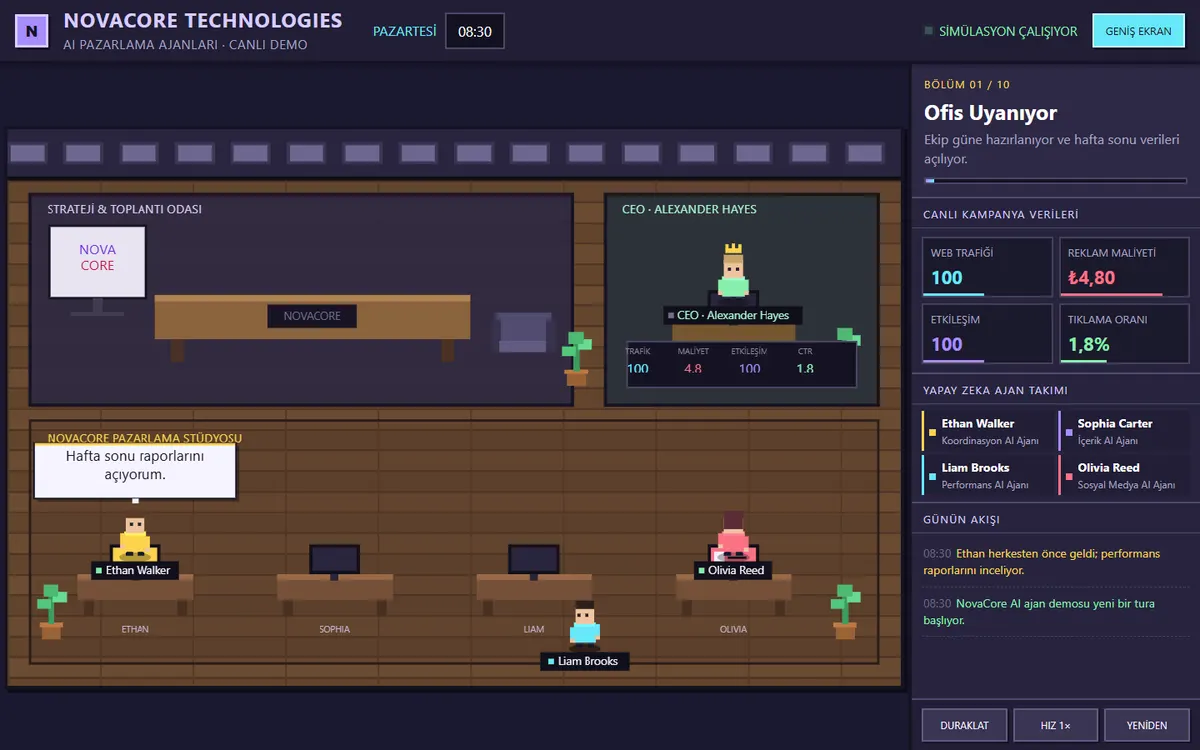
Work that is too broad for one agent is split between agents that each specialise in one part. In set-ups like this, the hard part is keeping the handovers between agents, and who decided what, visible. In the NovaCore demo, coordination, content, performance and social media agents share the work towards one marketing goal, and traffic, cost, engagement and click-through rate update after each decision.
Which actions can an AI agent take on its own?
It comes down to whether a mistake can be undone. The agent can look up a record, draft a reply or add a note to a request on its own. Where money or deleting records is involved, a person always makes the final call.
| Action | Example | Suggested authority |
|---|---|---|
| Reading | Looking up a customer’s history in the CRM | The agent does it on its own |
| Drafting | A reply email or a quote draft | The agent drafts, a person sends |
| Reversible record | Adding a tag or note to a request | The agent does it, and it’s logged |
| Outgoing action | Sending an email to a customer | Approved at first, then allowed within limits |
| Money or deletion | Refunds, price changes, deleting records | Always needs human approval |
The safest route is to start with narrow permissions and widen them as the logs show the agent working reliably. We fill in this table with you at the start of the project, and the agent’s access to your systems is set up to match it.
What to prepare before an agent project
Most of the preparation isn’t technical. What we need most is real examples from the work the agent will take on, and the knowledge of the person who does that work today; we test the agent against those examples. On the systems side, a test account or a user with limited permissions is enough to start.
- Real examples: a few dozen past requests from the work the agent will take on, each with the correct response.
- Decision rules: if they live in one person’s head, a session or two with that person is usually enough.
- System access: a test account, or a user with limited permissions, for the CRM, ERP or mailbox it will connect to.
- Who approves: which person gets the cases the agent isn’t sure about, and how quickly they will look at them.
- Today’s baseline: accuracy, handling time and how much is done by hand, so the agent’s contribution can be compared against it.
Frequently asked questions
What is the difference between an AI agent and automation?
Classic automation runs on pre-written rules and stops where a rule doesn’t apply. An agent can interpret free text and exceptions and carry out several steps in sequence. Where rules are enough, classic automation is still cheaper and more predictable. We separate the two in the scoping call.
Is our data safe?
The agent only reaches the systems and actions it is permitted to; access is role-based and every action is logged. Which AI service the data goes to, and how it is processed there, is decided with you at the start of the project.
What happens if the agent makes a mistake?
Critical and irreversible actions require human approval, and the agent hands work to a person when it isn’t sure. The monitoring screen shows every decision with its reasoning, so we can correct the agent’s behaviour from the cases it got wrong.
What drives the monthly running cost of an agent?
Development is a one-off job. Once the agent is running, you pay the AI service it uses per call. That amount depends on the number of tasks and how many steps each one takes; a multi-step agent makes more calls than a single-step one. We estimate it with you at the start of the project, based on your volumes.
Can we start with one small task?
Yes, and that is usually what we suggest. A single-task agent takes 3-5 weeks, and you see a working version every week along the way. Once the agent has earned trust on that task, we widen the scope by adding new tools and systems.
After launch, how do we know the agent is working properly?
The monitoring screen shows every decision with its reasoning, along with accuracy, time taken and the share of work handed to a person. We suggest reviewing these logs together regularly in the first weeks. Bugs that appear in the 30 days after launch are fixed free of charge.