
What makes mobile different
The difference lies in how a phone is used: the person in the field is usually standing, using one hand, with a few seconds to spare. So on mobile, good design is measured by how many seconds one record takes. If a flow isn’t fast on a phone, that data never gets entered at all.
The phone also speeds up data entry. Reading an invoice or a licence plate with the camera, confirming a delivery by location or capturing a note by voice all remove manual entry.
Which approach fits you
If you have users on both platforms, a single codebase is usually the right route: you ship to iOS and Android at the same time, in 4-8 weeks, and both versions are updated together. A single platform makes sense when your users are mostly in one ecosystem. If you don’t need to be in the app stores, mobile web (PWA) is the quickest to build.
| Approach | When it’s right | Time |
|---|---|---|
| Single codebase (iOS + Android) | Both platforms needed, shared budget and timeline | 4-8 weeks |
| Single platform | Your users are mostly in one ecosystem | 3-6 weeks |
| Mobile web (PWA) | No store release needed, zero install friction | 2-4 weeks |
| Addition to an existing app | You have an app and need a new module or a refresh | 2-5 weeks |
A typical budget for this service is US$5,000-20,000, excluding VAT (as of October 11, 2026). Where you land in that range depends on the number of user types, the systems to connect and how much design work there is; the exact figure comes as one price once the scope is written down.
Cost and timeline guide
Every budget band, our rates by role and the timeline for each scope tier, on one page.
Pricing
The four engagement models, payment terms and what the price covers.
A mobile app without a dashboard is incomplete
Behind every mobile app there is a web dashboard where the data is managed. For a courier app it’s the screen where HQ assigns orders; for a customer app it’s where content and campaigns are managed. We plan both together, because an app delivered without a dashboard becomes unmanageable after the first week.
How a record gets from the field to head office
When a courier confirms a delivery or a technician adds a photo, the record is saved on the phone first and sent to the head office dashboard once there is a connection. Nobody has to stop and wait for signal. The hard part of a mobile project is making that hand-off reliable.
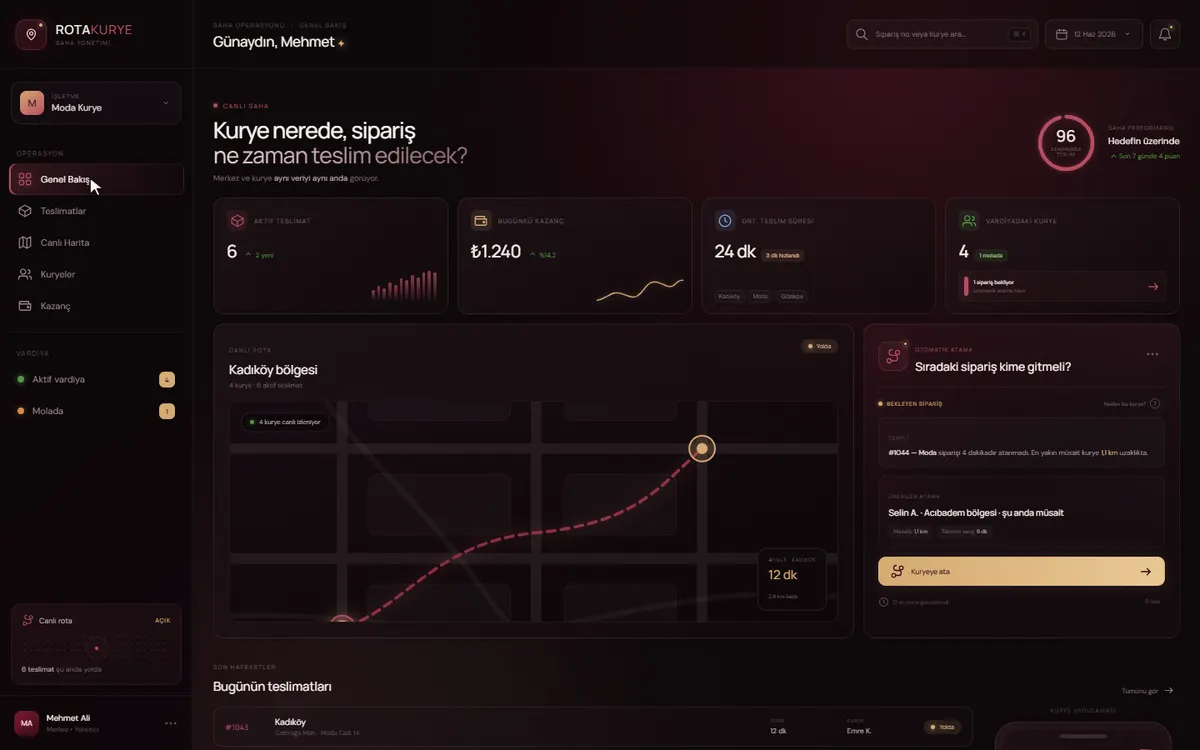
The RotaKurye demo shows the head office side of this flow: an operations screen where couriers are tracked on a map and each waiting order is assigned to the best-placed courier.
What does it take to publish an app on the App Store and Google Play?
You need Apple and Google developer accounts in your company’s name, a few documents and details the stores ask for, and the icons, screenshots and description copy. We prepare the artwork and copy; opening the accounts and gathering the details falls to you. These steps sit on your side, so we suggest starting on them while development is still under way:
- Apple and Google developer accounts. Apple asks for a D-U-N-S number to open an account as an organisation, which can take a while if your company doesn’t have one yet.
- A published privacy policy page. Both stores require the link.
- If the app needs a login, a test account for the store reviewers.
- A few options for the app name. The one you want may already be taken by another app in the store.
- If the app handles personal data, a clear answer on what you will declare in each store’s data-use form.
What changes after a mobile app launches
The app’s code stays as it is until someone changes it, but the phones it runs on and the stores it is listed in keep changing. That means a mobile app needs regular maintenance after launch, so don’t budget for the first version alone. Allow for these:
Yearly OS releases
iOS and Android ship a new version every year. The app needs testing on it and, where necessary, an update.
Every update is reviewed
Even a small fix goes through store review. Leave a few days’ margin for urgent fixes.
Store rules
Apple and Google update their rules regularly. A new rule can mean changes to an older screen.
Users on older versions
Not everyone updates straight away. Back-end changes are planned so they don’t break older versions.
The first 30 days
Bug fixes are free for 30 days after launch. After that, a monthly retainer is the usual fit.
Frequently asked questions
How long does it take to build a mobile app?
A first version with iOS and Android builds from a single codebase is typically ready in 4-8 weeks; a single platform takes 3-6 weeks, and mobile web that needs no store release takes 2-4 weeks. These figures exclude App Store and Google Play review, for which you should budget roughly a week each.
Are iOS and Android developed separately?
No, we ship to both platforms from a single codebase. This lowers both time and cost noticeably and keeps the two platforms updated together. Only where a platform-specific hardware requirement exists is that part written separately.
Do you publish the app to the stores?
Yes, we run the release process: icons and store artwork, description copy, privacy policy requirements and the review process. Accounts are opened in your name; the store listing always stays with you.
Will the app work without an internet connection?
Where it needs to, yes. In field apps offline operation is usually essential: records are held on the phone and synchronised automatically once connectivity returns. This behaviour must be planned into the first version; adding it later means rebuilding the data model.
Who pays for the store accounts?
The accounts are opened in your name, so you pay the fees directly. Apple’s developer programme has a yearly membership fee and Google Play a one-off registration fee, both paid straight to Apple and Google.
Who handles updates after launch?
Updates are prepared for both platforms together from the single codebase, and each one goes through store review. Bug fixes are free for 30 days after launch; after that we carry on under a monthly retainer or job by job. If you take the source-code transfer, available for an additional fee, your own team or another team can also take it on. If Pepechura ever ceases trading, the source code is handed over to you.