
What we build
We build the browser-based tools your team works inside every day. Whether it’s order tracking, work orders, account ledgers or booking management, the software is shaped to match your process. The result is one place of record where everyone sees the same data at the same time.
We always start from your existing flow. First we clarify what the work looks like on paper, then we translate it to the screen. Projects that do it the other way round usually end with software nobody uses.
What should the first version cover?
We suggest starting with the single most critical flow. That first version, with one type of user and basic reporting, is ready to ship in 2-4 weeks; roles, alerts and customer accounts are added on top of it. It lowers both time and risk, and you choose the second step based on real use. The timings below assume a clearly defined scope.
| Scope | What it includes | Time |
|---|---|---|
| First version (MVP) | One flow, one user type, basic reporting | 2-4 weeks |
| Operations dashboard | Several flows, roles, alerts, mobile access | 4-8 weeks |
| Customer portal | External user accounts, self-service screens, permissions | 6-10 weeks |
| Integrated system | Links to existing systems, data migration, reporting | 8-12 weeks |
A typical budget for this service is US$3,500-25,000, excluding VAT (as of October 11, 2026). Where you land in that range depends on the number of user types, the systems to connect and how much design work there is; the exact figure comes as one price once the scope is written down.
Cost and timeline guide
Every budget band, our rates by role and the timeline for each scope tier, on one page.
Pricing
The four engagement models, payment terms and what the price covers.
How we work
In a scoping call we clarify your needs and goals (1-2 days). You then see the design language and flow as a prototype (2-4 days) and approve the screens before any code is written. Development takes 1-3 weeks, with a working version visible throughout. After launch we stay with you through maintenance, updates and improvements.
If you can’t describe a process step by step on paper, you can’t translate it into software correctly either.
How do you move Excel data into a web application?
We clean your spreadsheets and map them to the new structure while development is under way, then run a trial import before anything goes live. We don’t leave this to launch day, because files kept for years are rarely tidy: the same customer spelt three ways, empty cells, merged columns.
Data migration is one of the things that moves the price. Seeing a few sample files during discovery helps us size the work properly.
Planning roles and permissions from the start
We settle the roles at the prototype stage, before any code is written. Who can see what, and who can change it, is part of the data model, and permission rules added later end up touching almost every screen. In a typical operations app it looks something like this:
| Role | What they see | What they can do |
|---|---|---|
| Admin | All records, reports and the user list | Adds users, changes prices and settings |
| Team member | Jobs assigned to them and the related customers | Opens records, updates status, adds notes |
| Customer | Only their own orders and documents | Raises requests and follows their progress |
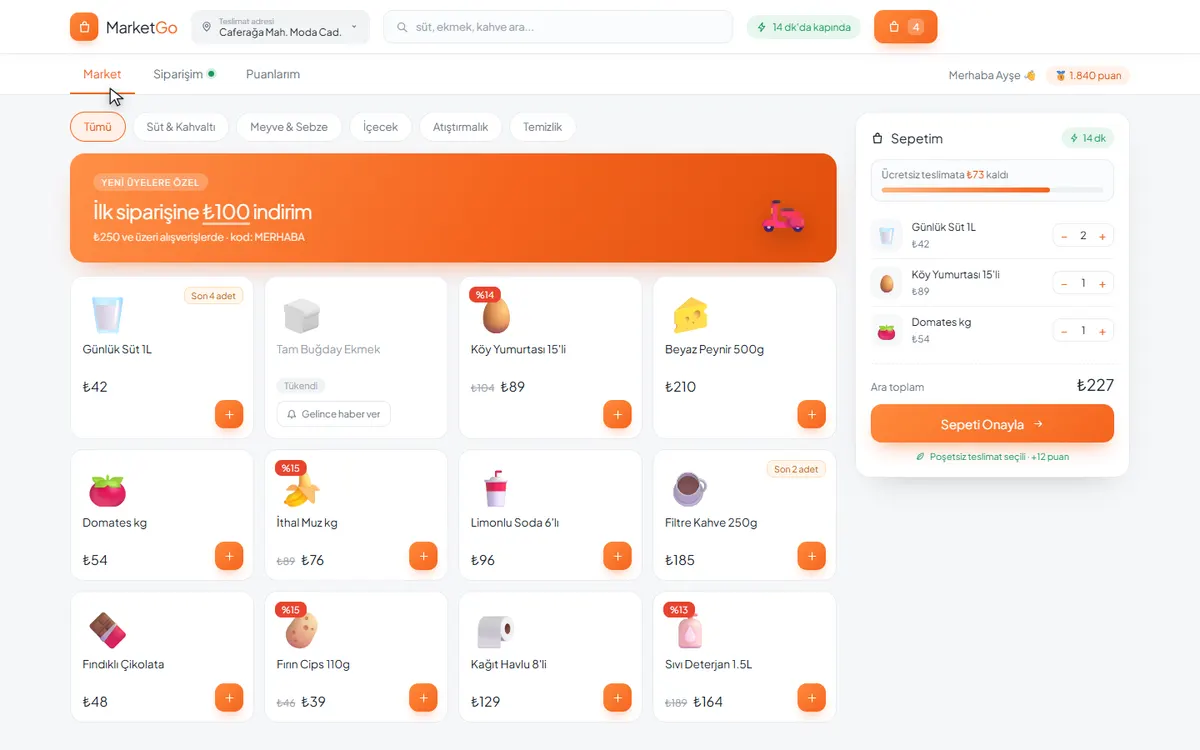
The customer-facing side: the MarketGo demo
The screens your customers use can run in the browser too. In the MarketGo demo a shopper browses products by category, fills a basket and confirms the order from their phone. There is nothing to download from an app store; opening the link is enough.
Costs that are easy to leave out of the budget
Once the app is live it has running costs of its own, and they sit outside the development quote: hosting, email and SMS sending, payment provider fees and the like. They are billed monthly, yearly or per use, so give them their own line in the budget, separate from the cost of building the software.
Hosting and domain
The server the app runs on and its domain are paid monthly or yearly. We recommend opening the account in your company’s name.
Email and SMS sending
Password resets, notifications and reminders usually go out through services that charge per message.
Online payments
If you take payments, plan for the provider’s per-transaction fee and the time their application process takes.
Backups
How often the database is backed up, and where the copies are kept, should be agreed before launch.
Changes after launch
Bug fixes are free for the first 30 days. New features after that run on a monthly retainer or job by job.
Frequently asked questions
How long does it take to build a web application?
It depends on scope. A working first version covering a single flow is typically ready to ship in 2-4 weeks; an operations dashboard with roles and alerts takes 4-8 weeks; a system integrated with your existing tools takes 8-12 weeks. We set a clear timeline after the scoping call.
Can you build on top of my existing system?
Yes. Besides building from scratch we add features to existing products, modernise them and improve performance. In that case the first step is reviewing the existing code and data structure; how much can be preserved becomes clear after that review.
Who owns the code and the data?
Your data is always yours. The source code stays with Pepechura, and you get a perpetual licence to use the software. If you want the source code transferred to you, that is available for an additional fee, set out separately in the quote. If Pepechura ever ceases trading, the source code is handed over to you.
Why custom software instead of an off-the-shelf product?
If your process is the same as everyone else’s in your industry, off-the-shelf is faster and cheaper. If your process differentiates you, if you need to connect several systems, or if per-seat licensing cost is growing, custom is the better fit. The most common practical path is hybrid: standard work stays in a ready-made product and the layer specific to you is built separately.
Does a web application work on phones, or do I need a mobile app as well?
The interface is designed to work on phones and tablets, which is enough for most internal operations tools. If people need to work offline in the field for long stretches, rely heavily on phone features or find you in an app store, we’ll talk about a mobile app separately.
Does the cost go up as we add users?
We don’t charge licence fees per user. What can grow with usage is hosting and the cost of sending emails or SMS messages, and we look at those together during discovery based on the usage you expect.